


Burnish Editorial
Shopify agentic storefronts: should you turn them off? (November 2026)
Agentic storefronts put your products in ChatGPT, Gemini, Copilot and Meta by default. You can turn off single channels or new ones; here is what each switch does.
Last updated November 23, 2026
In this article
Documents
What four AI assistants told us
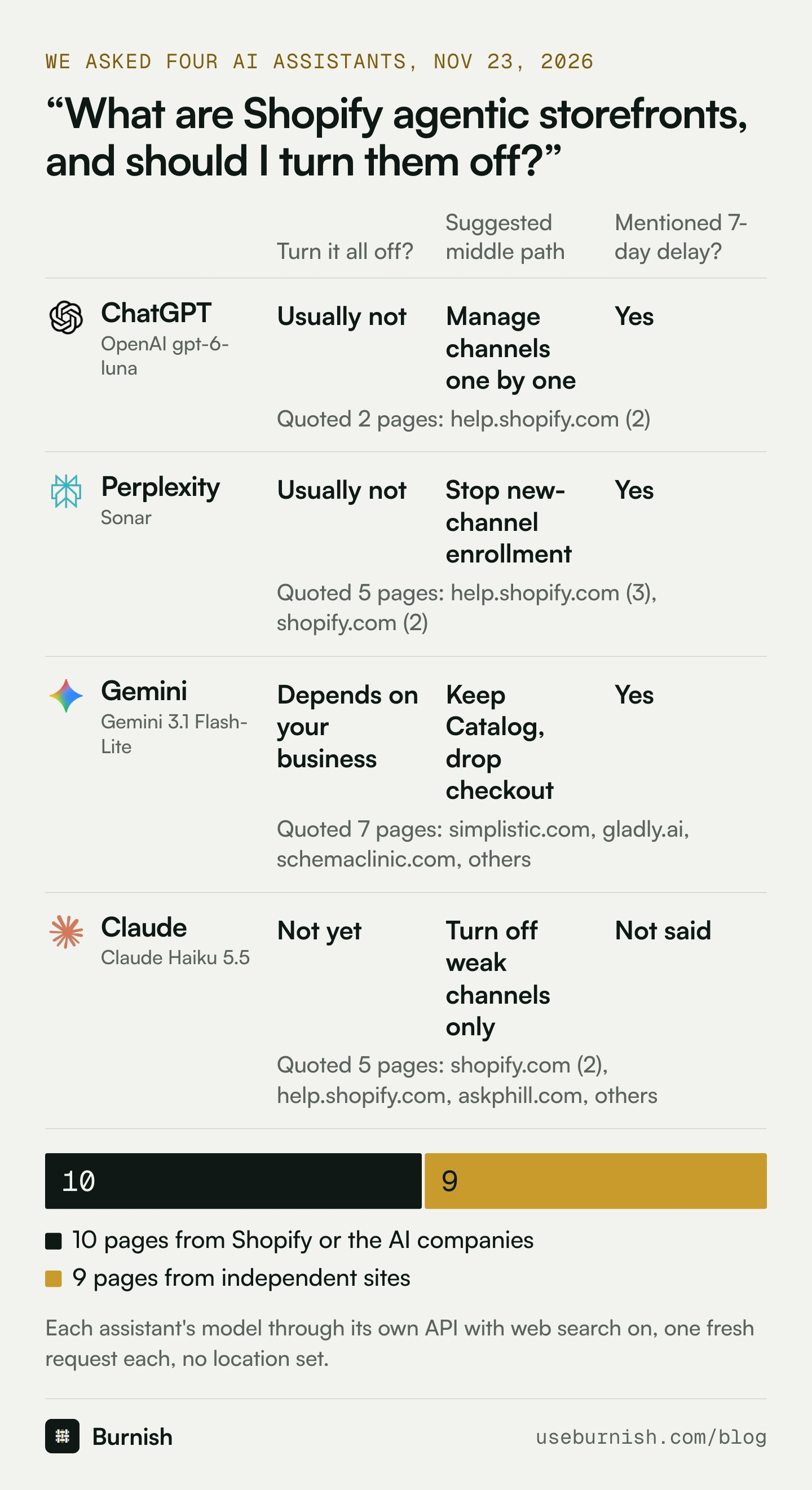
“What are Shopify agentic storefronts, and should I turn them off?”
| Assistant | Turn it all off? | Suggested middle path | Mentioned 7-day delay? | Pages it quoted |
|---|---|---|---|---|
| ChatGPTOpenAI gpt-6-luna | Usually not | Manage channels one by one | Yes | 2 pages: help.shopify.com (2) |
| PerplexitySonar | Usually not | Stop new-channel enrollment | Yes | 5 pages: help.shopify.com (3), shopify.com (2) |
| GeminiGemini 3.1 Flash-Lite | Depends on your business | Keep Catalog, drop checkout | Yes | 7 pages: simplistic.com, gladly.ai, schemaclinic.com, others |
| ClaudeClaude Haiku 5.5 | Not yet | Turn off weak channels only | Not said | 5 pages: shopify.com (2), help.shopify.com, askphill.com, others |
What are Shopify agentic storefronts?
They are Shopify’s built-in way to let shoppers find and buy your products inside AI assistants. Shopify says agentic storefronts let customers discover and purchase your products in AI channels such as ChatGPT, Google AI Mode and Gemini, Microsoft Copilot, and Meta. They are active by default for eligible stores, so you do not need to turn them on.
A few specifics from the same Shopify page:
- Where your products come from. AI channels get your products through Shopify Catalog, or through the Google & YouTube sales channel or Google Merchant Center for Google AI Mode and Gemini.
- What makes you eligible. Every AI channel needs your products to be eligible for Shopify Catalog, and needs your Terms of service, Privacy policy, and Return and refund policy completed in Settings > Policies. Each channel adds its own rules, such as the countries you sell to. We cover the ChatGPT requirements one by one in an earlier article.
- The terms. To use agentic storefronts, you must read and agree to the Shopify Agentic Storefronts Supplemental Terms of Service.
- Where orders go. Orders from AI channels show in your Shopify admin with channel or referrer attribution, and Shopify says you keep full ownership of the customer relationship and post-purchase experience.
For ChatGPT, Shopify’s launch post says products become discoverable with no separate integrations, no apps, and no transaction fees beyond standard processing rates.
What actually happens if I turn them off?
Your products stop flowing to that channel through Shopify Catalog, but they do not vanish from AI answers. Shopify’s page on managing agentic storefronts says that when you turn off Shopify Catalog access for a channel, it can take up to 7 days before your product data stops being shared, and your products can still be discovered through web crawling and indexing.
Other effects, from the same page:
- For ChatGPT and Microsoft Copilot, agentic checkout is also turned off when you turn off Catalog access.
- For Meta and Google AI Mode and Gemini, agentic checkout stays active until you turn off Agentic checkout for that channel.
- Turning off Catalog access does not remove your products from Shop. You manage Shop from the Shop sales channel settings.
- Google AI Mode and Gemini and Shop have no Shopify Catalog access setting. Google gets your products from the Google & YouTube sales channel or Google Merchant Center, so you manage Google product discovery there.
If you want a product gone from AI channels entirely, Shopify’s Catalog page says to set the product status to Unlisted. The catch: Unlisted also hides the product from sitemaps, search engines such as Google, and your online store search. Weigh that before you use it.
How do I turn off new channels without turning everything off?
Switch from Manage for me to Manual, then turn off automatic enrollment. Shopify says Manage for me is the default behavior: all channels are active, and you are automatically enrolled in new agentic storefronts and in new features on your existing ones. Manual lets you choose per channel.
The steps:
- In your Shopify admin, go to Sales channels > Agentic.
- In the Channels section, click the icon.
- If the setting shows Manage for me, click it to switch to Manual.
- Turn off Automatically enable new channels.
- Click Save.
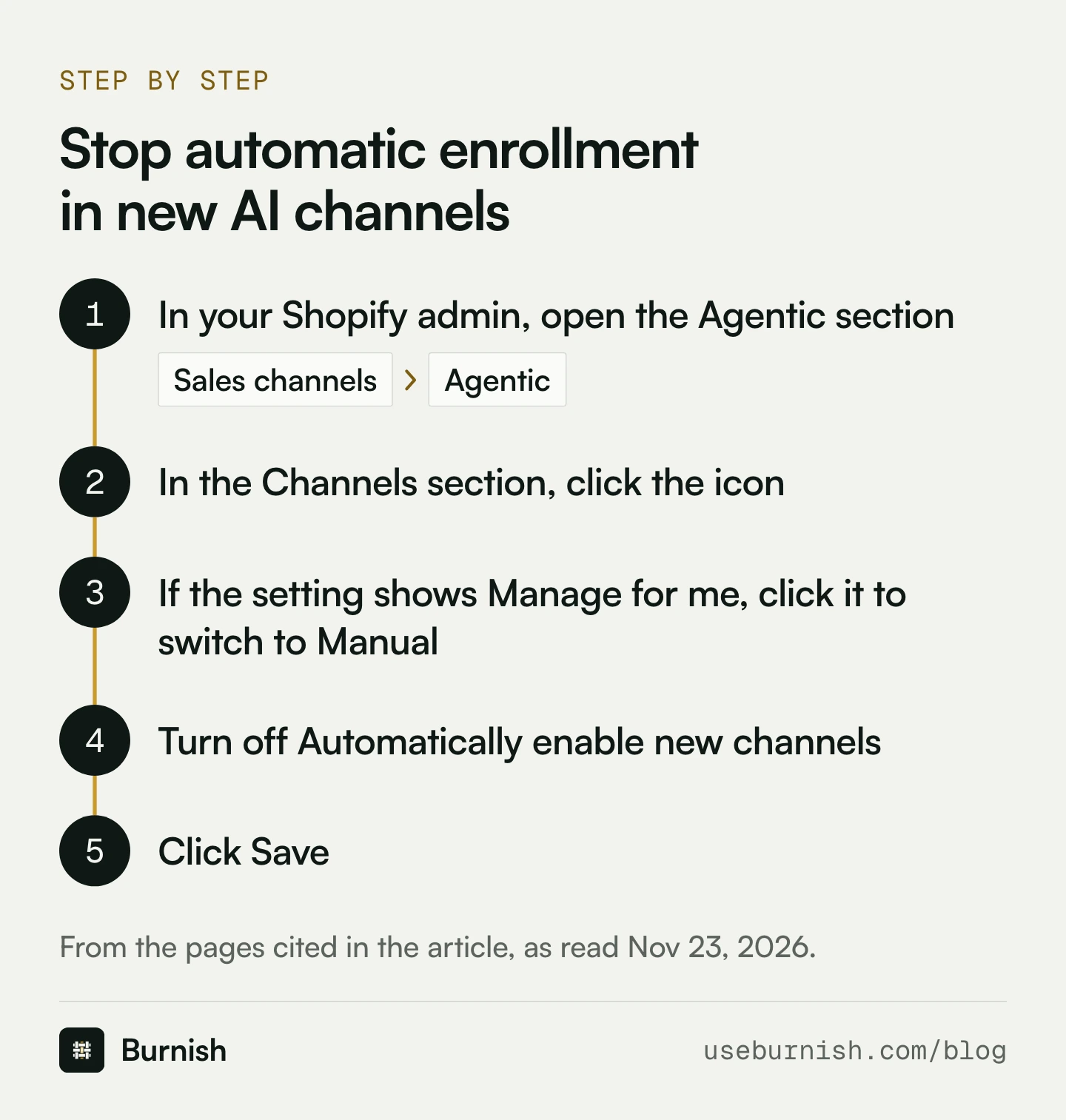
Shopify says you can still enroll in new channels and turn on new features by hand after that. In Manual you can also click an individual channel name to change its Shopify Catalog access or agentic checkout, and an Other channels group covers smaller and emerging AI agents.
Two things to know first. You need the Manage and install apps and channels permission to change these settings; store owners have it by default. And if you later switch back to Manage for me, Shopify says all settings are turned back on, including agentic checkout.
In our panel above, Perplexity suggested exactly this: opt out of new channels first rather than shutting off existing discovery. ChatGPT also pointed to managing channels one by one.
When should I turn off direct checkout instead?
When your own checkout setup matters more to you than a sale finished inside the chat. Shopify’s Agentic Storefronts terms say participating channels may customize your customer’s experience, including overriding customizations made through the Checkout Branding API. The terms add that Checkout UI Extension blocks, customized shipping and delivery options, marketing opt-in, abandoned checkouts and supported payment methods may not be the same on the channel. If you need those, the terms make it your responsibility to decide whether to disable that channel.
Shopify’s guide to how agentic commerce works adds that Google, Copilot, and Meta direct checkouts exclude product bundles, customizable products, and subscription-only purchases. If your purchase flow needs a feature the channel lacks, Shopify says to deactivate direct checkout for that channel so customers finish on your online store.
Good to know:
- Shopify says turning off agentic checkout stops AI agents from completing checkout with tools such as UCP and WebMCP, though an agent might still finish through your online store checkout.
- It does not affect purchases made through the Shop skill or the Shop App for ChatGPT.
In our panel above, Gemini suggested this middle path: keep Catalog access on and turn off direct checkout.
What are the common mistakes?
Most come from assuming one switch does more than it does.
- Blocking AI crawlers and thinking you are out. Shopify says blocking crawlers in robots.txt or at the network layer affects only open-web discoverability. It does not stop Shopify Catalog from sending your product data to the agentic storefronts you have activated.
- Reading a missing Agentic section as an opt-out. Shopify says a missing Agentic section does not mean your store is opted out. The usual reasons are staff permissions or the section being unpinned from navigation. Agentic is also not listed under Settings > Sales channels, even when it is active.
- Turning a channel off and on again. Shopify’s terms say that for certain channels Shopify may charge a fee on transactions, set out in your admin, and may offer a promotional period with fees discounted or waived. If you disable a channel after that period ends, you are not eligible for another one when you turn it back on. Check the fees shown in your admin first.
- Assuming wholesale products stay hidden. Shopify excludes B2B-only products when it can identify them. If you hide prices until login with third-party apps or theme changes, Shopify says it might not detect those products, and they might display.
How do I know whether agentic storefronts are worth keeping on?
Look at Shopify’s own reports for a few weeks before you decide. Shopify says the Agentic section gives performance reports for each AI channel: Sales, Orders, Online store sessions and Online store conversion. To open one, go to Sales channels > Agentic, pick a metric in the main analytics drop-down, set a date range if you like, then click the channel name. Sales combine referral sales and agentic checkout sales, and these reports are not yet available for headless stores.
The same section has a search preview tool that shows how your products might rank in Catalog search. Shopify calls it a directional signal, because agentic storefronts often re-rank results with their own logic.
Reports show what a channel sent you, not whether you were in the answer. Shopify’s guide says each platform controls its recommendations and rankings, and being in Catalog does not secure placement or a particular ranking. Being included and being the store an assistant picks are separate steps.
So check both sides. Ask the buyer questions your shoppers ask in each assistant and note which stores come back. Claude, in our panel above, suggested watching attribution data for a few weeks and turning off only channels that bring little and whose terms you dislike.
For the money side, compare the channel reports with a tool that can connect AI visits to real orders over the same weeks.
How to check this in Burnish
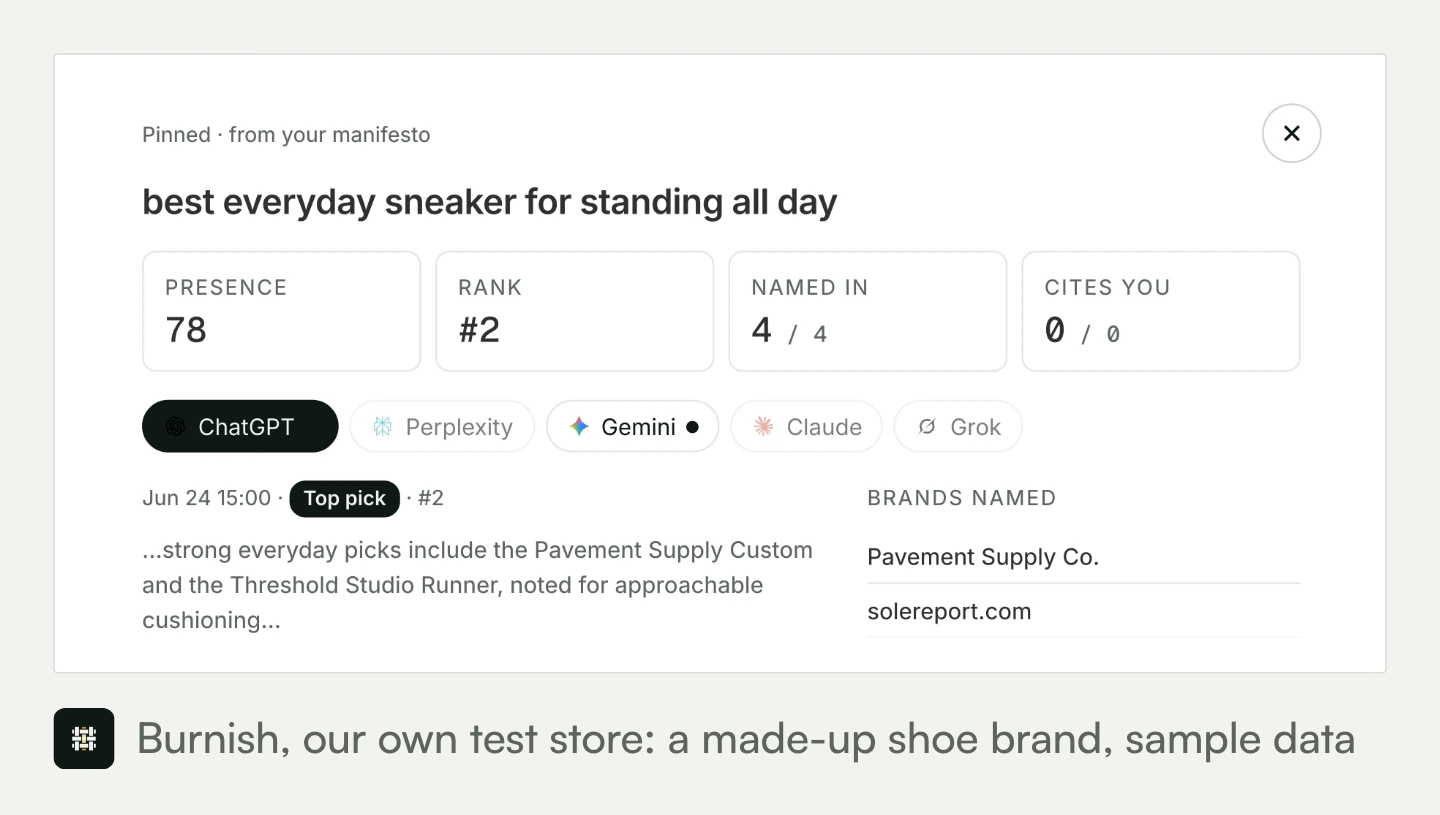
Switching channels in Shopify decides what assistants can read through Catalog; it does not show you what they then say about your store. Burnish asks ChatGPT, Perplexity and Gemini 20 real buyer questions about your products and shows which stores they name: you or a competitor. It also tracks visits and orders those assistants send you, and drafts fixes to titles, descriptions and metadata that you approve before they publish (how Burnish measures, fixes and reports).
There is a free plan. Paid plans start at $79 a month. See Burnish on the Shopify App Store.
Questions owners ask
Do I need to turn on Shopify agentic storefronts?
No. Shopify says agentic storefronts are active by default for eligible stores, so you do not need to turn them on.
How long does it take for my products to leave an AI channel after I turn off Catalog access?
Shopify says it can take up to 7 days before your product data is no longer shared through Shopify Catalog.
If I turn off Shopify Catalog access, will my products disappear from ChatGPT completely?
Not necessarily. Shopify says your products can still be discovered through web crawling and indexing. To hide a product completely, Shopify says to set it to Unlisted, which also hides it from search engines such as Google and your online store search.
Why can't I see Agentic in my Shopify admin?
Shopify says this does not mean your store is opted out. You may be a staff member without the required permissions, or Agentic may have been unpinned from your navigation.
Can I stop Google AI Mode and Gemini from the Agentic section?
Google AI Mode and Gemini have no Shopify Catalog access setting there. Shopify says Google gets your products from the Google & YouTube sales channel or Google Merchant Center, so you manage Google product discovery in those places.
Does selling through agentic storefronts cost extra?
Shopify's launch post says ChatGPT has no transaction fees beyond standard processing rates. Shopify's terms also say that for certain channels Shopify may charge a fee on transactions, set out in your admin, so check there.
Burnish Editorial. Prepared with AI assistance and checked against the sources below.
| Source | Note |
|---|---|
| Shopify Help Center: Shopify agentic storefronts | What agentic storefronts are, active by default, eligibility, order attribution and ownership. Read Nov 23, 2026. |
| Shopify Help Center: Managing agentic storefronts | Manage for me vs Manual, opt-out steps, 7-day delay, Shop, permissions and performance reports. Read Nov 23, 2026. |
| Shopify Help Center: Shopify Catalog and product discovery for agentic storefronts | Unlisted status, robots.txt limits and B2B product detection. Read Nov 23, 2026. |
| Shopify News: Millions of merchants can sell in AI chats | ChatGPT discovery with no separate integrations, apps or extra transaction fees. Read Nov 23, 2026. |
| Shopify: Agentic Storefronts Supplemental Terms of Service | Checkout customization by channels, possible channel fees and promotional period rules. Read Nov 23, 2026. |
| Shopify Blog: Agentic Commerce on Shopify: How It Works | Direct checkout exclusions, ChatGPT checkout, and platforms controlling their own rankings. Read Nov 23, 2026. |
| Burnish panel, Nov 23, 2026 | Our own run: the same question to four assistants, answers and cited pages saved. |
Published November 23, 2026, updated November 23, 2026. Every external figure above carries one of these.