


How AI revenue attribution works

Connecting AI traffic to sales
Revenue attribution answers a simple question: when an AI assistant sends a shopper to your store, does it lead to a sale? Burnish connects AI-referred visits to orders, so you can see the revenue your visibility earns.
What it uses
Burnish reads from one or both of two signals:
- The Burnish Web Pixel, a first-party pixel on your storefront that reports visits, add-to-carts, and checkouts with their referral source. No personal data is collected.
- Google Analytics 4, if you connect it, as an additional cross-check.
You need at least one of these in place for revenue to appear. With neither connected, the revenue page prompts you to connect a source.
How the numbers are built
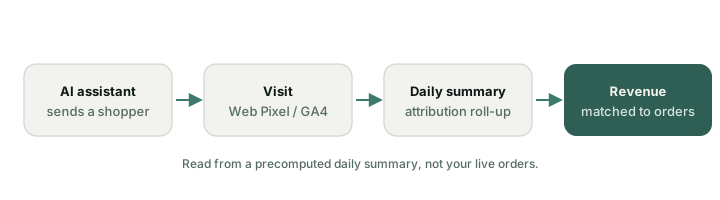
Once a day, Burnish rolls your signals into a daily attribution summary for your store. The revenue page reads these prepared summaries, not your live orders, so it loads fast and stays available even when your store is busy.
Honest limits
Attribution is based on correlation, not a controlled experiment, so treat it as a strong directional signal. GA4 needs about 30 days of history before the numbers settle, and some AI traffic arrives labeled as direct, which Burnish flags separately rather than overcounting.
The Web Pixel is the simplest path and works without GA4. Connecting GA4 as well gives Authority plans a second source to cross-validate against.
Was this helpful?
Thanks for the feedback.